Managing CMS Users
Table of Contents:
Note: You must have have privilege level of “Administrator” or "Global Administrator" to access this area.
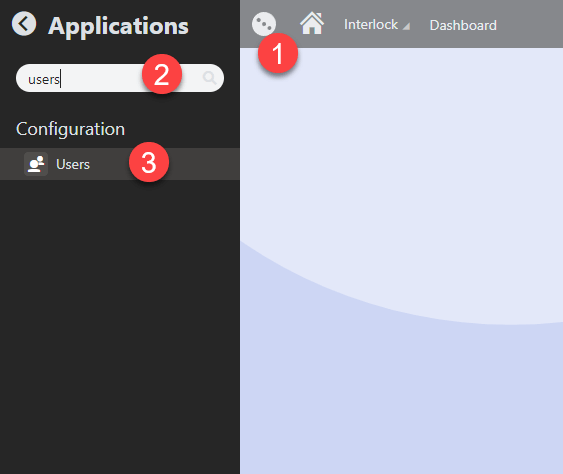
- Click on the Applications icon
- Type "Users" in the search bar
- Click on Users
How to Create a User

- Navigate to the Users interface
- Click on New user button
- Fill in the fields
- Click on the Save button
Note: Keep in mind that the Privilege level dropdown has three options: Editor, Administrator and Global Administrator. Users with Administrator role will be able to access additional areas in Kentico, such as the Media Library, Redirects, and Users. A Global Administrator will have access to everything in Kentico, including all technical modules, so this role should be delegated cautiously.
How to Update a User

- Navigate to the Users interface
- Find the intended user and click on the Edit icon
- Update the fields
- Click on the Save button
How to Delete a User

- Navigate to the Users interface
- Find the intended user and click on the Delete icon
- Click on OK in the confirmation message